
How to Connect Claude Code to Google Tag Manager, Step by Step
The most common problem with conversion tracking is a mismatch between the code and Tag Manager. A developer changes a form, and the tag in Tag Manager is still waiting for the old event. When Claude Code has access to both the code and Tag Manager, it changes both in the same task.
This is the third of four guides that accompany our case study on Claude Code on an obituary portal. You use the service account from the Search Console guide here too.
Step 1: enable the Tag Manager API
In the service account’s Google Cloud project, under “APIs & Services”, enable the Tag Manager API.
Step 2: add the service account to Tag Manager
- In Tag Manager, open “Admin”, then “User Management” at account level.
- Add the service account’s email.
- Choose the container permission:
- Read if Claude only reads the settings,
- Edit if it prepares changes in a workspace,
- Publish if it may also publish a version.
We use Publish, with one rule: Claude publishes every version with a name and a description, and only after the code change has been merged.
Step 3: agree how events are sent
The code pushes events to the dataLayer, and Tag Manager reads them and forwards them to GA4, Meta and Google Ads. On the obituary portal it looks like this:
window.dataLayer.push({ ecommerce: null });
window.dataLayer.push({
  event: 'begin_checkout',
  ecommerce: { currency: 'EUR', value: 39, items: [{ item_id: 'digitalni-memorijal' }] }
});
In Tag Manager, each such event has a “Custom Event” trigger and a tag that forwards it. For groups of events we use one trigger with a regex, so a new event from the same group does not need a new tag.
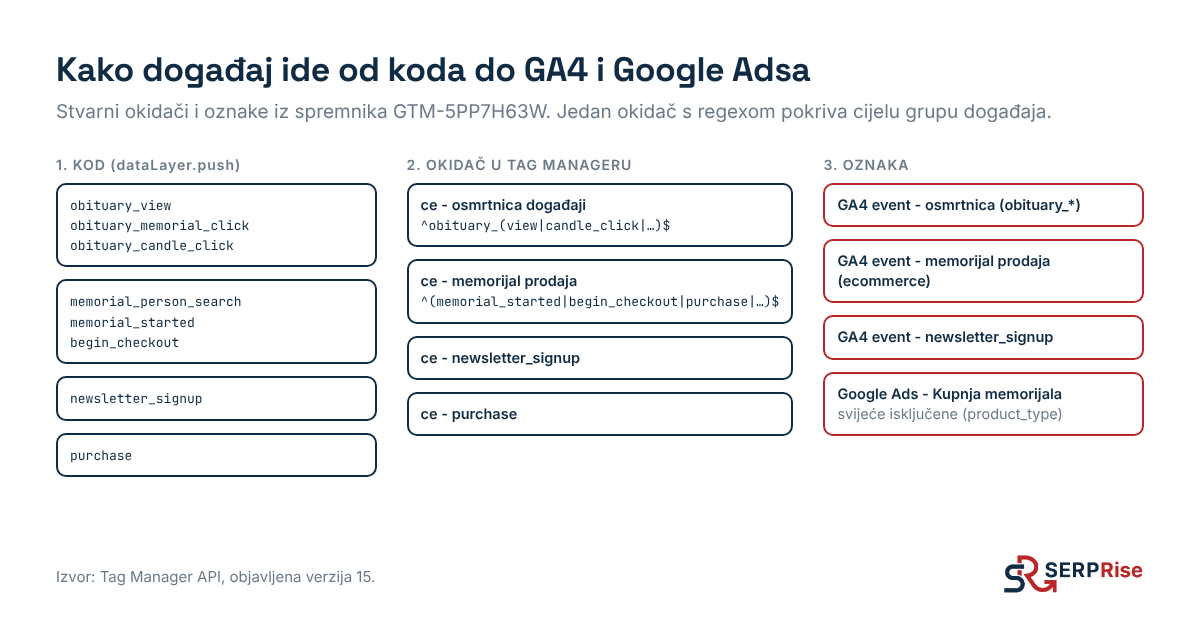
Step 4: how Claude changes the container
Through the API, Claude does the same as you would in the interface:
- creates a workspace,
- adds or changes tags, triggers and variables,
- creates a version with a name and a description,
- publishes it.
Since 16 October, 9 versions have been published on the portal this way:
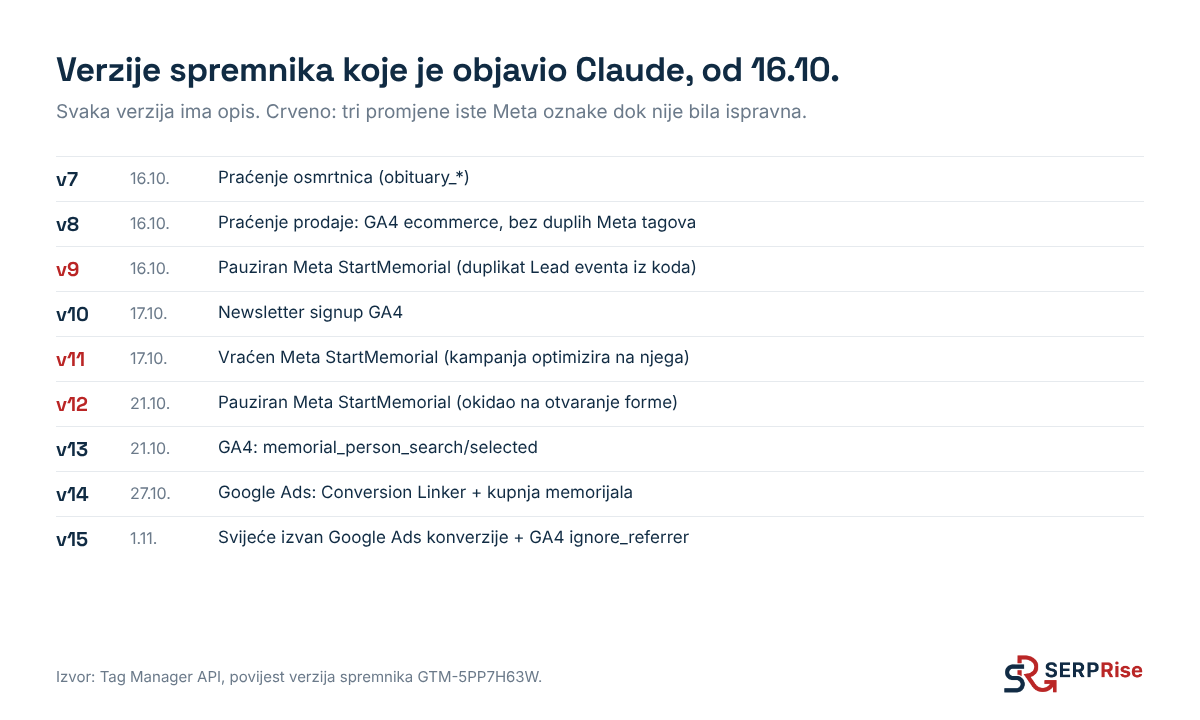
The descriptions matter. When someone asks in a month why the conversions differ, the version history says what was changed and why.
What to watch out for
- Duplicate events. If the same event is sent by both the code and a tag in Tag Manager, it will be counted twice. This happened to us with Meta StartMemorial: we paused the tag, brought it back because the campaign was optimising for it, then paused it again once the code started sending the correct event.
- Review before publishing. For bigger changes, ask Claude to create a version without publishing it, then check it in Preview mode.
- Cookie consent. Tags must respect consent. In our setup the code does not push events without consent, so Tag Manager has nothing to send.
Next step
Meta events are sent from both the browser and the server. How to connect them without duplicate conversions is described in the guide to Meta Pixel, Conversions API and Meta Ads.