
How to Connect Claude Code to Meta Pixel, Conversions API and Meta Ads
Meta Pixel in the browser loses some events to ad blockers, declined cookies and Safari. The Conversions API (CAPI) sends the same events from the server. When both are set up correctly, Meta gets more data to optimise campaigns, and conversions are not counted twice.
This is the fourth of four guides that accompany our case study on Claude Code on an obituary portal.
The three parts we connect
- Meta Pixel in the browser, through Tag Manager or directly in the code.
- Conversions API from the server. For us, these are Supabase functions that run when a memorial is created or a payment is confirmed.
- Meta Ads data (campaigns, spend, clicks) for Claude, through a connector.
Step 1: a token for the Conversions API
- In Meta Events Manager, select your Pixel (dataset).
- In “Settings”, under “Conversions API”, click “Generate access token”.
- Store the token as a secret on the server, for example META_CAPI_ACCESS_TOKEN. For us it is a secret in Supabase, available only to server functions.
For testing, the “Test events” tab on the same screen gives you a test code. Store it as a separate variable, so you can switch it on and off without changing the code.
Step 2: the same event_id in the browser and on the server
This is the most important rule. If the Pixel and the server send the same event with the same name and the same event_id, Meta merges them into one. If the event_id differs, the conversion is counted twice.
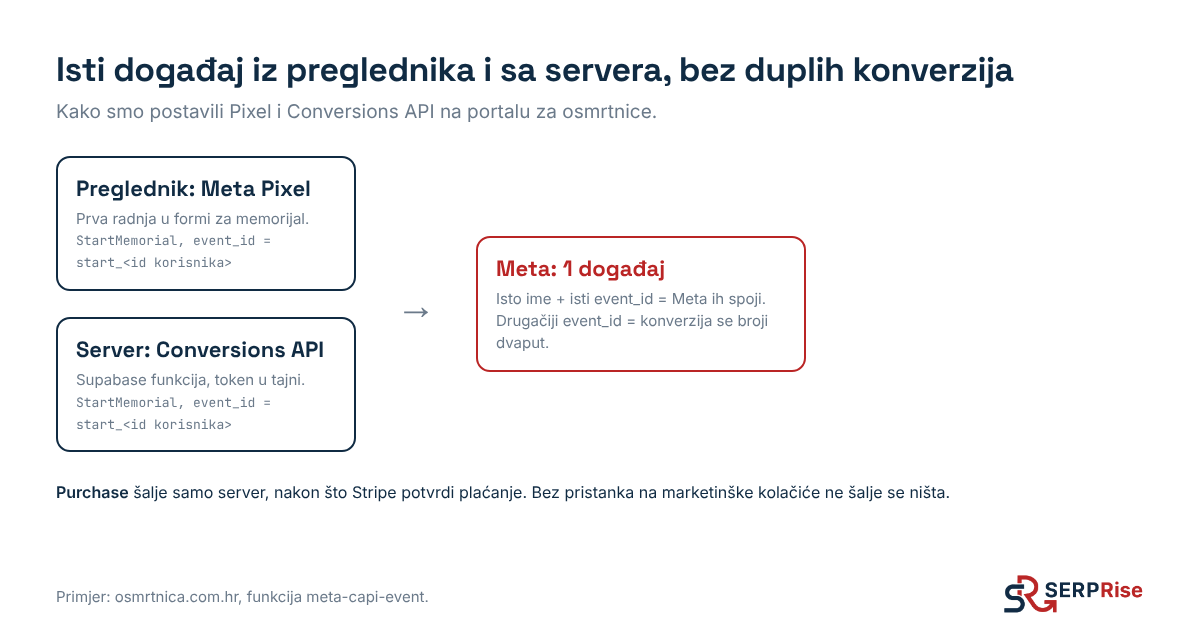
In our setup the event_id is derived from a real object: for starting a memorial it is a prefix plus the user ID (start_ and the ID). That way both the browser and the server know it without having to coordinate.
The rules we gave Claude:
- the purchase event (Purchase) is sent only by the server, and only once Stripe confirms the payment,
- the server function accepts events only from the production domain,
- events are sent only with consent to marketing cookies,
- email and name are sent only hashed (SHA-256), as Meta requires,
- if sending fails, the event is saved to a table and sent again.
Step 3: check it
- Turn on the test code and go through a purchase or sign-up on the site.
- In Events Manager, on the “Test events” tab, you should see the same event twice: once from the browser (Browser) and once from the server (Server).
- After a few hours, the event overview should show that they have been merged (deduplicated).
Claude can also write a small test function that sends one test event with the test code. Ours is called test-meta-capi.
Step 4: Meta Ads data for Claude
To read campaigns we use the Windsor.ai connector in Claude. Once it is connected, Claude gets spend, clicks and conversions per campaign in the conversation and can compare them with data from GA4 and Search Console.
This is the real answer to one question about the portal’s campaigns in October:
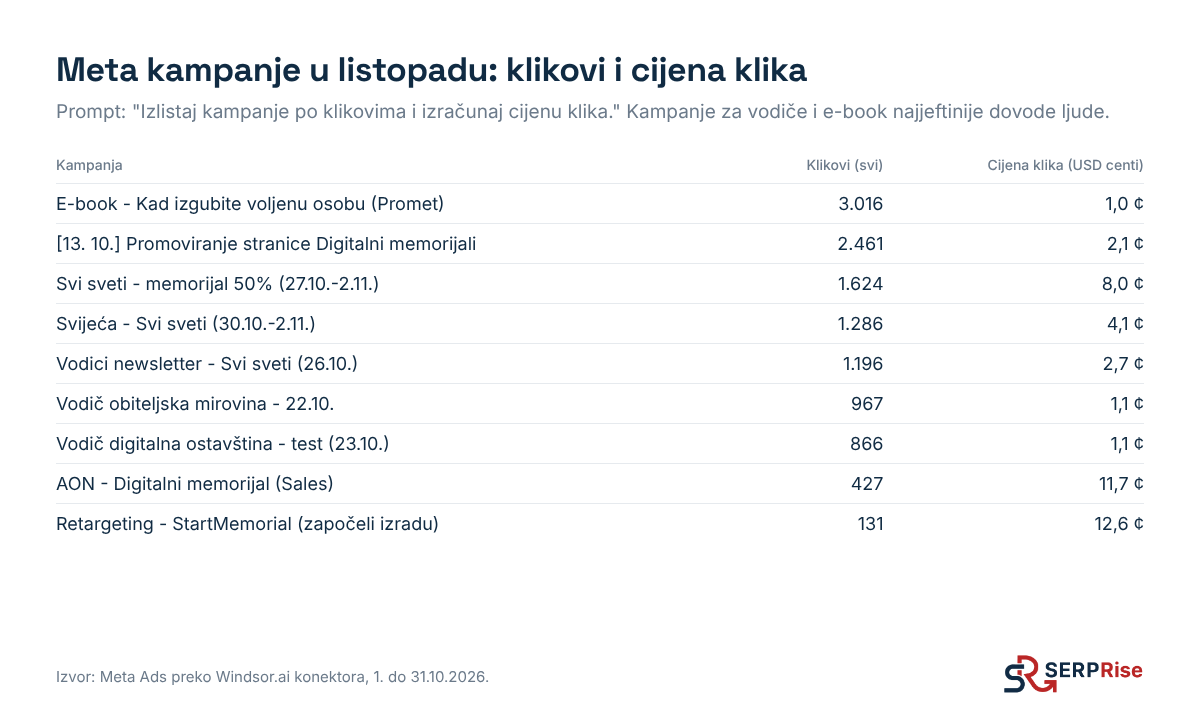
Campaigns for the free guides and the e-book have a cost per click of about 1 cent, while the sales and retargeting campaigns are around 12 cents. That is not bad in itself, because sales campaigns target a smaller, warmer audience. But it shows why we used the guides as the first step: they cheaply bring in people who then sign up for the newsletter.
The same connector also supports changes to campaigns (for example pausing them). Claude makes such changes only when you explicitly confirm them.
What to watch out for
- Do not optimise a campaign for an event that fires too early. For a while our StartMemorial fired as soon as the form was opened, so the campaign was learning from the wrong people. The fix was in the code: the event is now sent only after the first real action in the form, and the tag in Tag Manager is paused.
- Standard and custom events. Alongside our own events (StartMemorial) we also send standard ones (AddToCart, Subscribe), because Meta makes better use of them for optimisation.
- Tests. Automated tests on the site must not send events to Meta. Our code recognises them and skips them.
Putting it all together
How Search Console, GA4, Tag Manager and Meta come together in one project, and what that brought, is described in the case study.