
How to Connect Claude Code to Google Analytics 4, Step by Step
Connecting GA4 to Claude Code means two things. Claude reads the reports (sessions by source, events, sales) and, in the same conversation, changes the code that sends those events. When a form or the checkout steps change, the tracking changes in the same pull request.
This is the second of four guides that accompany our case study on Claude Code on an obituary portal. The first step, the service account, is described in the Search Console guide.
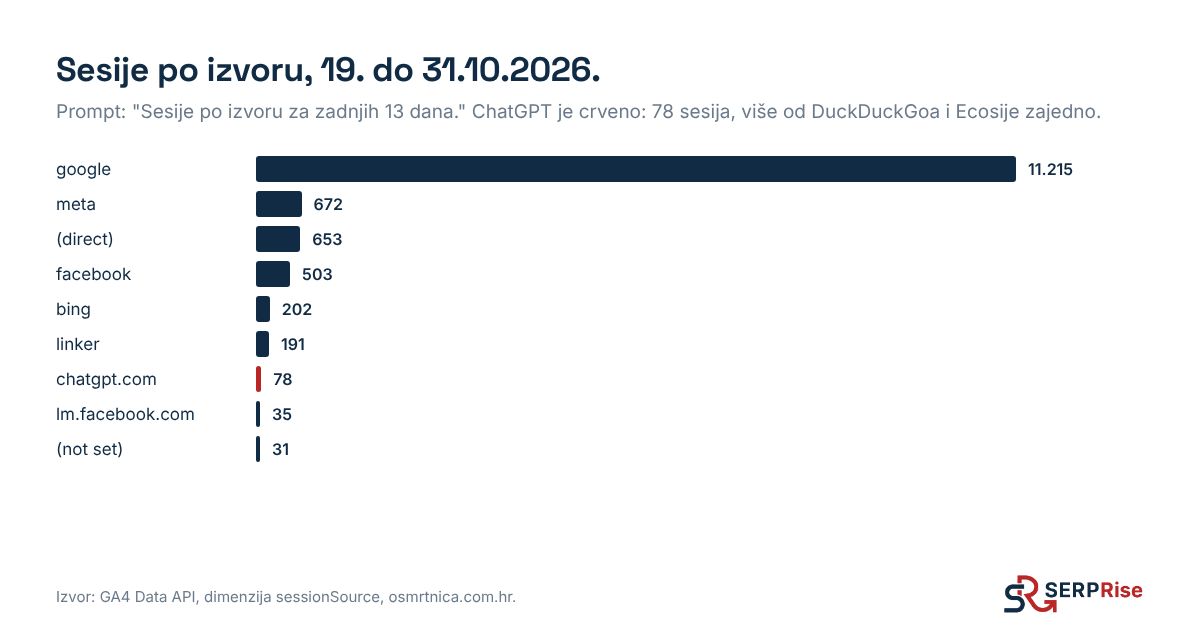
The chart above is the first report we asked for after connecting: sessions by source for the last 13 days. Without opening GA4, you can see that ChatGPT already brings more visits than DuckDuckGo and Ecosia combined.
Step 1: enable the GA4 APIs
In the same Google Cloud project, under “APIs & Services”, enable:
- Google Analytics Data API to read reports,
- Google Analytics Admin API if you want Claude to see properties and set key events.
Step 2: add the service account to GA4
- In GA4, open “Admin”, then “Property access management” (or “Account access management” for the whole account).
- Click the plus, “Add users”, and enter the service account’s email.
- The “Viewer” role is enough for reading. You need “Editor” if Claude sets key events or custom dimensions.
On the obituary portal the service account has the Editor role. On 16 October Claude used the Admin API to mark memorial_started and obituary_memorial_click as key events, right after adding them to the code.
Step 3: the property ID
Reports are requested by property ID (a number, not the G-XXXX measurement ID). The easiest way is to ask Claude: “List the GA4 accounts and properties the service account can access.” Put the number you get into the project rules or an environment variable, for example GA4_PROPERTY_ID.
Step 4: how to send events from code
We send GA4 events through Tag Manager, not directly. The code only pushes the event to the dataLayer, and Tag Manager forwards it to GA4. For sales we use the GA4 ecommerce names (begin_checkout, purchase), so revenue shows up in the standard reports.
The rules we gave Claude, and which we recommend:
- events are sent only from the production domain, so tests and previews do not pollute the data,
- only with consent to analytics cookies,
- purchase has a transaction_id, so GA4 does not count the same purchase twice,
- the ecommerce object is cleared before every ecommerce event, so values do not carry over from one event to the next.
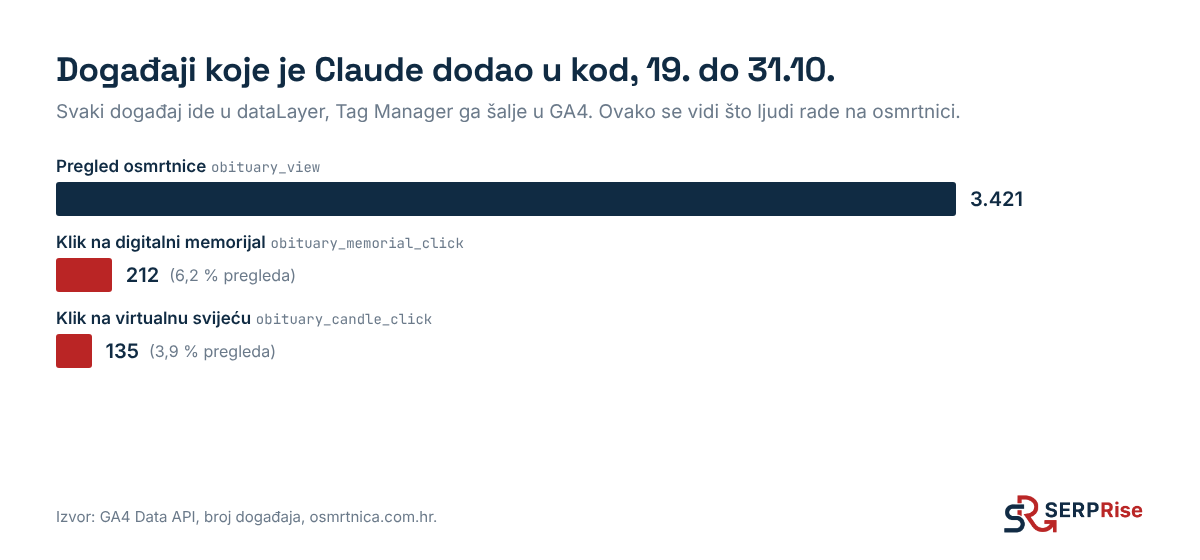
This is what it looks like in numbers. Obituary view, memorial click and candle click are events Claude added to the code on 16 October:
How the tags are set up in Tag Manager is described in the Tag Manager guide.
What to ask once it is connected
- “How many sessions from chatgpt.com were there per day in October?”
- “Show the funnel: person search, person selected, creation started, payment.”
- “Compare GA4 sessions with Search Console clicks by day and tell me where they disagree.”
The last question showed us that from 1 to 18 October GA4 recorded roughly a quarter of visits, even though Search Console clicks were normal. We marked that period as not comparable in our statistics.
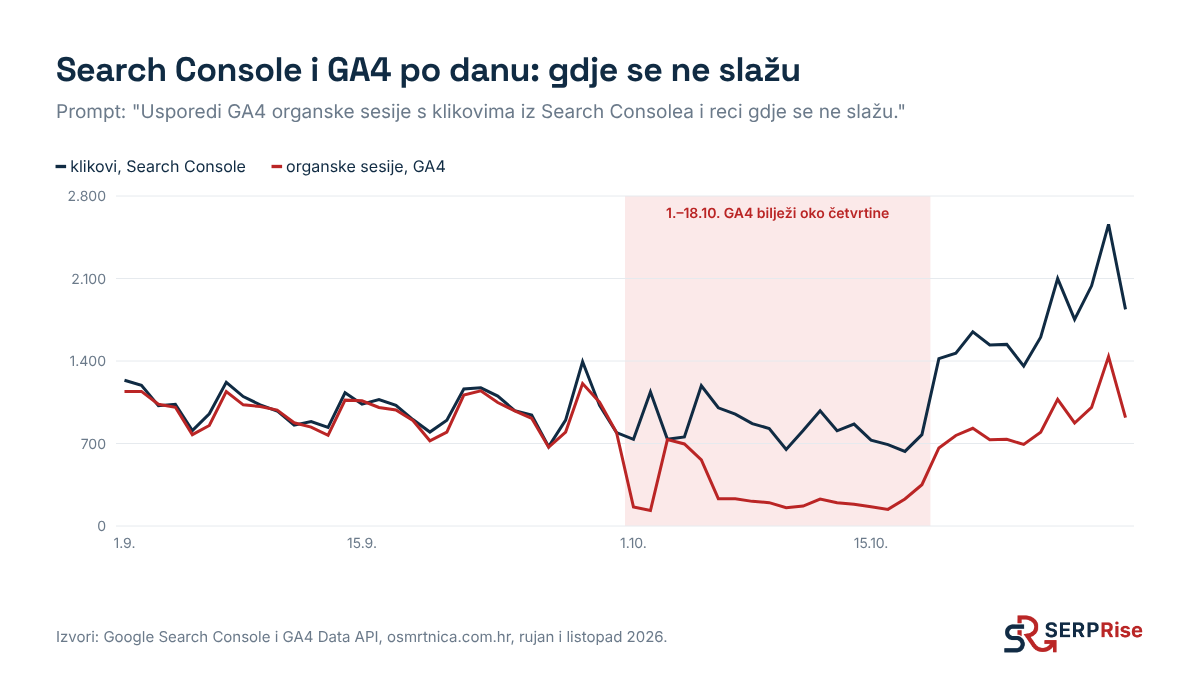
The gap still exists after 19 October, but it is smaller. Part of it is expected: GA4 does not record visitors who decline cookies, while Search Console counts every click.
Common errors
- “User does not have sufficient permissions”: the service account was not added to the property, or was added to a different property.
- API not enabled: the error mentions “has not been used in project”. Enable the API in the same project as the service account.
- Traffic from AI tools: GA4 puts part of it into Referral and Unassigned. The fix is in the article GA4 hides more than half of ChatGPT visits.