
Method: How to See What ChatGPT Searches For and Write a Page It Will Cite
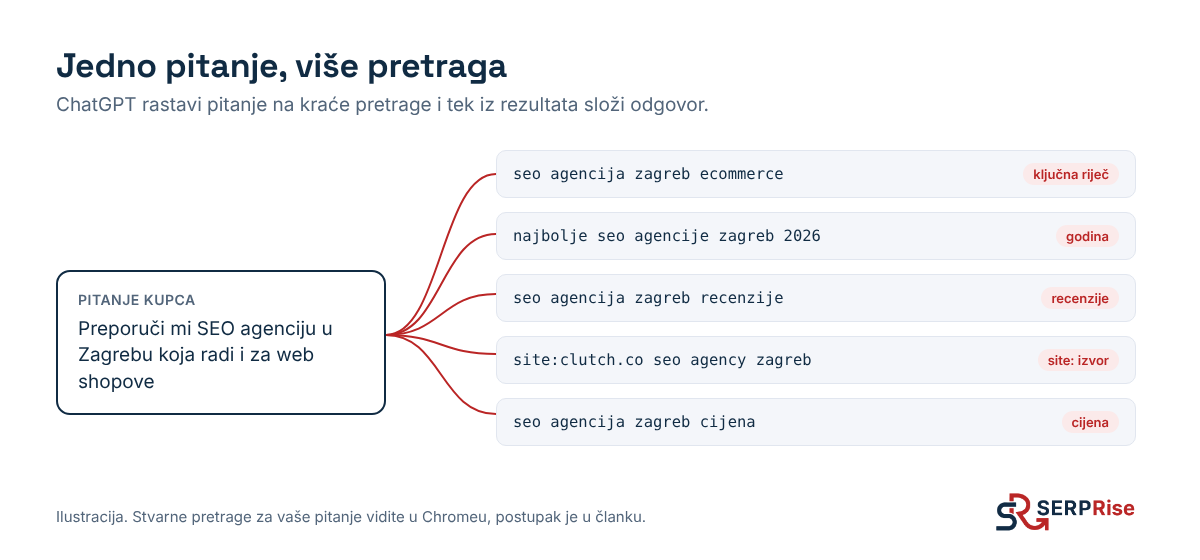
When a customer types “Preporuči mi SEO agenciju u Zagrebu” (recommend me an SEO agency in Zagreb) into ChatGPT, ChatGPT does not search for that sentence. It breaks it into several shorter searches, sends them to a search engine and builds its answer from the results. Those searches are the keywords your page needs to exist for. If you know them, you know what to write. You can see them in 2 minutes, for free, in Chrome.
In our test of 35 Croatian questions, these very searches explained most of the results. ChatGPT searched general questions in English, but as soon as a question included a city, “Hrvatska” (Croatia) or “cijena” (price), it searched in Croatian and cited Croatian pages.
Before you start
- Turn on Temporary chat (top right corner) or use ChatGPT without logging in. That way memory and earlier conversations do not change the searches. The vast majority of people use the free version, so this is also closest to what your customer sees.
- Check that a search actually ran. The answer must have sources (links or a “Sources” button). If it does not, ChatGPT answered from memory and there are no searches to read. Add “search the web” to the end of your question.
- Ask like a customer, with a city or country. ChatGPT often translates a question with no local element and searches in English. Your Croatian page is then competing with the whole English-speaking internet.
- Reasoning models search several times. If you want to see every angle of a topic, ask the same question in a model with extended thinking too. For a picture of what most customers see, the default model is enough.
How to see the searches in Chrome
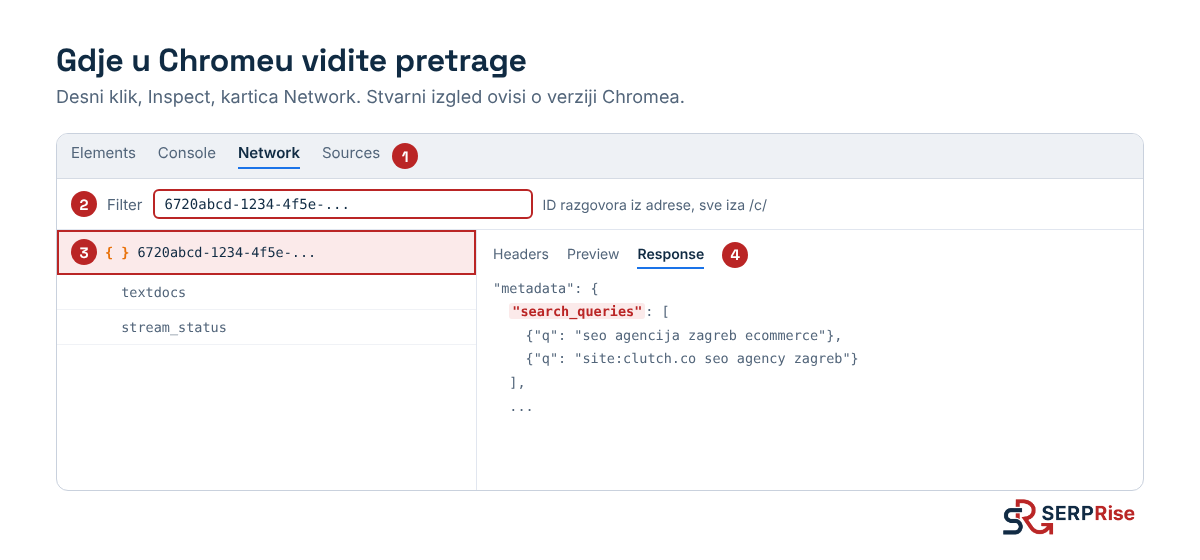
- Ask your question and wait for the answer to finish.
- In the address bar, copy everything after
/c/. That is the conversation ID, e.g.6720abcd-1234-.... - Right-click anywhere on the page, then Inspect. Open the Network tab.
- Paste the conversation ID into the Filter box.
- Reload the page (F5). A request named after the conversation ID appears in the list, with a curly-brackets icon
{ }. Click it. - Open the Response tab, press Ctrl+F (Cmd+F on a Mac) and search for
search_queries. If it is not there, search for justqueries. - Below it are the searches ChatGPT sent to the search engine. Copy them.
While you are in the same window, press Ctrl+F again and type your domain. If you find it in the response, but you are not among the sources in ChatGPT’s answer, ChatGPT opened and read your page but did not cite it. The problem then is not that it cannot find you, but what the page says.
NOTE: ChatGPT changes its interface from time to time, so the field name may change. The Network tab method stays the same. There are also free Chrome extensions that show the searches automatically, but the manual method always works and does not need access to your account.
What to read from the searches
A search does not just give you a keyword. The words ChatGPT adds tell you what kind of page it is looking for.
| The search contains | What it means | What to check on your site |
|---|---|---|
| a year, e.g. “2026” | It wants fresh information | Is the last-updated date visible on the page, and is the content really up to date |
| “cijena”, “price”, “koliko košta” (how much does it cost) | It wants concrete amounts | Do you have prices in euros on your site. If not, it will cite someone else’s price list |
| “official”, “službena stranica” (official site) | It wants a first-hand source | Does your homepage say clearly who you are and what you do, in the first sentence |
| “recenzije”, “reviews”, “iskustva” (experiences) | It does not trust the company’s site and wants third parties | Do you have reviews on Google and on the directories that appear in the sources |
site:yourdomain.hr |
It goes straight to your site | Is there a page that answers exactly that question |
site: with another domain |
It trusts that domain on this topic | Are you on that page (directory, news site, list) |
| names of companies you did not mention | It had a shortlist before searching | Are you among those names. If not, you are not competing on your page alone but on how often others mention you |
| a search in English | The question had no local element | Is the topic worth targeting at all, or are you better off targeting questions with a city and a price |
One thing in the table deserves a closer check. When ChatGPT uses site: with your name in a search, see whether the domain is right. With lesser-known brands it sometimes guesses the wrong domain, e.g. .com instead of .hr. If this happens to you, put your full company name and line of business in your homepage title and description, and use the same name on all your profiles.
You can see the same searches in Search Console
Searches that AI tools send to Google are recorded in your Search Console, and you can filter for them.
- Search Console, Performance, Search results.
- + Add filter, Query, Custom (regex).
- Type
site:and confirm.
Queries that start with site:yourdomain.hr and have lots of impressions but almost no clicks are mostly not people. They are AI tools and other bots searching your site. The words after site: show what they were looking for on your site. If the same topic keeps coming up and you have no page for it, that is the first page you should write.
From 1 question to a list of searches
One question gives a few searches, which is too few to see a pattern.
- Write down 10 questions your customers ask. A ready-made list by type (recommendation, price, comparison, problem) is in the article The 20-question check.
- Ask each question in a new temporary chat and extract the searches.
- In a Google Sheet, enter: column A the question, column B the search, column C whether ChatGPT cites you (yes/no).
- Sort column B. A search that appears for several different questions is a priority.
Do you already have a page for that search?
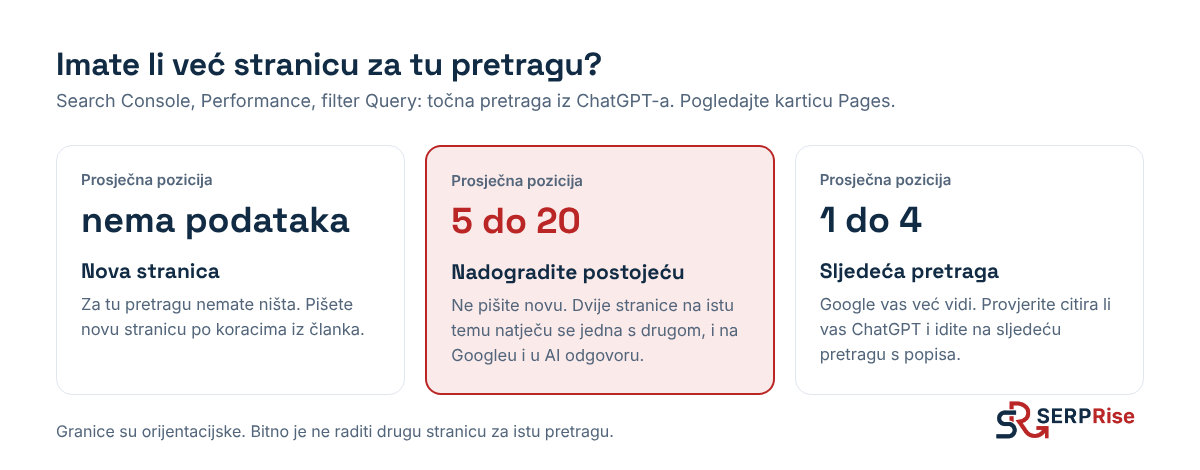
Before you write a new page, check that you do not already have one. A second page on the same topic does not help; it competes with the first.
- Search Console, Performance, + Add filter, Query, Exact query. Paste the search from ChatGPT.
- Turn on Average position and open the Pages tab.
How to write a page AI can cite
1) Structure from Google. Type the search from ChatGPT into Google. Open the top 3 organic results. With the free Chrome extension Detailed SEO Extension (Headings tab), copy the headings from each page into one document. This shows you which subtopics Google and ChatGPT expect for that search.
2) A better outline. Paste the headings into ChatGPT and write:
Moja ključna riječ je [pretraga iz ChatGPT-a]. Ovo su naslovi s prva 3 rezultata na Googleu: [naslovi]. Napravi raspored članka koji uzima najbolje od sva tri i pokriva ono što im nedostaje. Piši na hrvatskom.
(In English: “My keyword is [the search from ChatGPT]. These are the headings from the top 3 results on Google: [headings]. Create an article outline that takes the best of all three and covers what they are missing. Write in Croatian.”)
Then add to the outline by hand, because ChatGPT cannot know this:
- every search from your table that belongs to the same topic gets its own H2
- one section with something only you have: your price, your example, a screenshot, a figure from a project
3) The text. While you write or edit, stick to this:
- A summary at the top. 2 to 3 sentences that give the answer straight away. That is the part AI extracts most easily.
- The answer in the first sentence under each heading, in the same words as the heading. The heading “Koliko košta SEO u Hrvatskoj” (How much does SEO cost in Croatia) starts with “SEO u Hrvatskoj košta od…” (SEO in Croatia costs from…).
- Every section must make sense on its own. AI often takes just one paragraph. If a paragraph starts with “That is because…”, it makes no sense without the paragraph before it.
- One concept, one name. If you wrote “AI visibility”, do not switch to “LLM presence” and “GEO results” later for the sake of style.
- Numbers with units. “From 400 euros a month”, not “affordable prices”.
4) Meta data. Ask for the page title, meta description and URL. The title should contain the exact search, and the description one concrete benefit or figure.
Before publishing
- Add your own experience and at least one screenshot or photo of your own.
- Remove long dashes and phrases that give away AI text: “u današnjem dinamičnom svijetu” (in today’s dynamic world), “ključno je napomenuti” (it is crucial to note), “revolucionaran” (revolutionary), “neizostavan” (indispensable).
- Rewrite any sentence that could appear on any other company’s website.
- Read the text aloud once.
After publishing
- Internal links. Search Console, Performance, Pages tab, turn on Average position and sort. Pick 2 to 3 closely related pages that already rank well and add a link to the new page from their text.
- Indexing. Paste the new URL into the bar at the top of Search Console (URL inspection) and click Request indexing.
- Checking. Once the page is indexed, ask ChatGPT the same question in a new temporary chat. Repeat the Chrome method and search for your domain in the response. Note the date in your table and whether you are cited. Repeat once a week for 4 weeks.
At the end you have your own figure: how many days passed from publishing to the first citation, and whether ChatGPT at least opened your page before it started citing it.
We explain how this fits into the rest of AI visibility work in the guide LLM visibility: how a Croatian company gets into ChatGPT and Google answers. If you would like us to run this analysis for your customers’ questions, see our AI visibility service.